QNAP
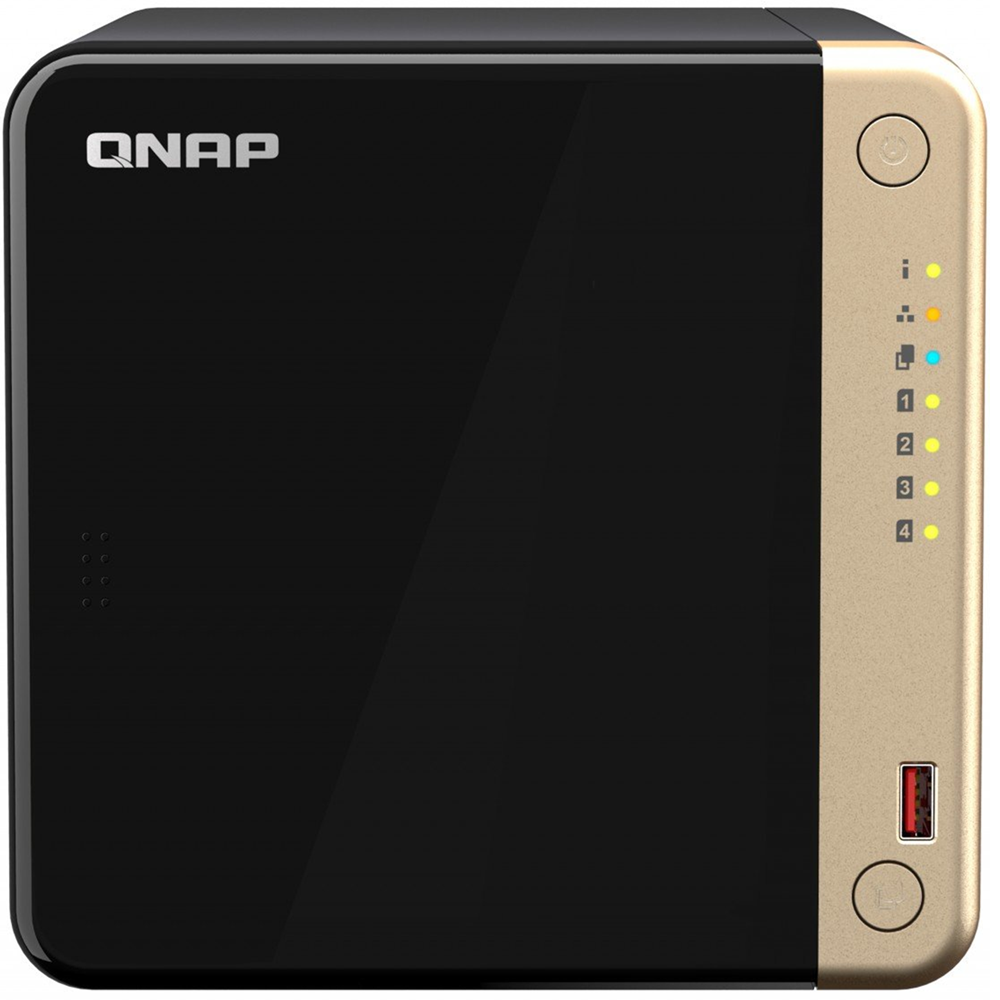
TS-464 is a compact 4-bay NAS with superior performance. Supporting up to 72 TB storage and 4 TB M.2 SSD caching* at an affordable price, the TS-464 fulfills your multitasking challenges for file management, backup, collaboration, and video conversion.
The TS-464 uses the QTS operating system by default. You will be able to switch to using the QuTS hero operating system. QuTS hero provides benefits such as ZFS data integrity and WORM technology to prevent data tampering. (Switching to QuTS hero is supported starting from QTS 5.2.1.)
Using four 3.5-inch 24 TB hard drives in RAID 5 and two 2 TB M.2 SSDs. Hard drives and SSD sold separately.


-
2.5GbE is a must!
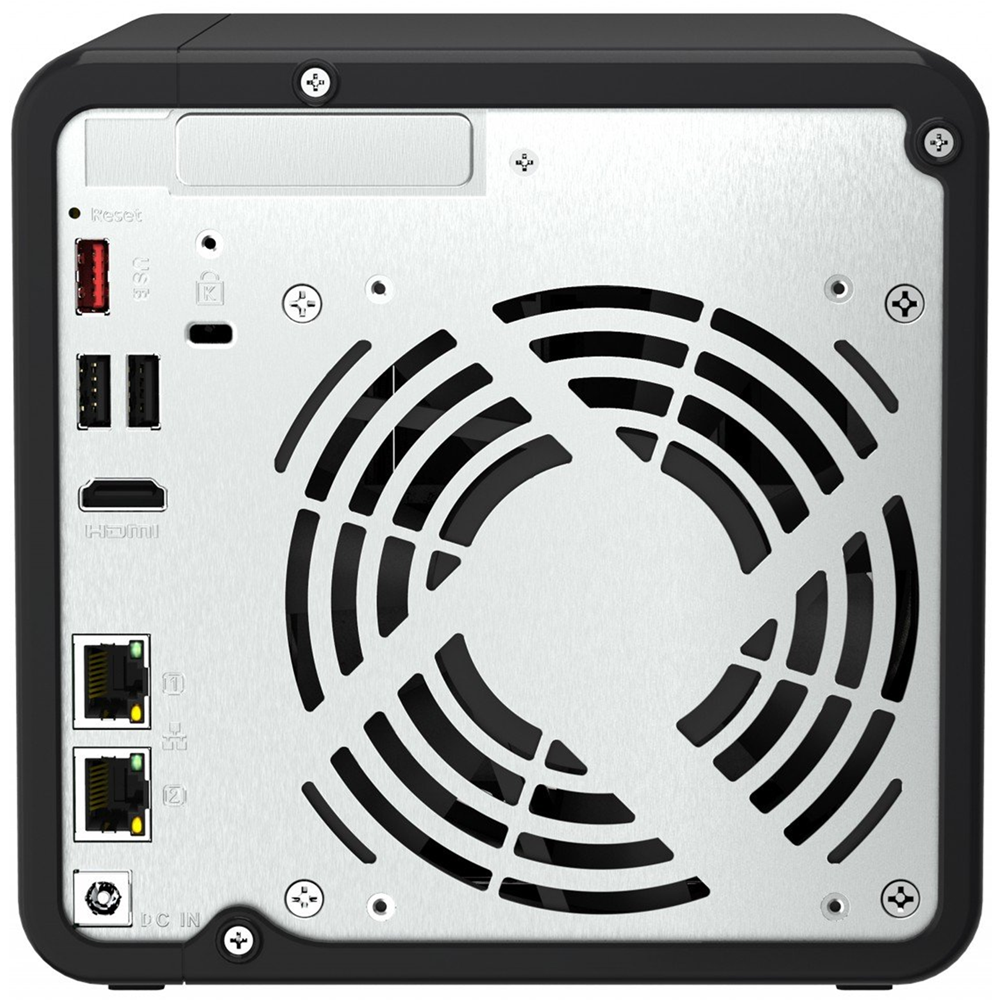
TS-464 is as fast as a single-port 10GbE NAS with up to 589 MB/s transfer speeds by setting port trunking with the two built-in 2.5GbE (2.5G/1G/100M) ports.
-
Quad-core for multitasking
Perform additional tasks, stream more media, and have more services running with an Intel® quad-core processor optimized for multitasking.
-
Smooth video conversion
Built-in GPU for enhanced video conversion, allowing videos to be smoothly streamed from the NAS to mobile devices.
-
Upgrade to dual-port 10GbE
Futureproof your network connection by installing a PCIe dual-port 10GbE network card that delivers up to 1,647 MB/s transfer speed.
-
Faster USB transfer
Two USB 3.2 Gen 2 (10Gbps) ports allow faster backup to/from USB devices.
-
More M.2 NVMe SSDs
If two M.2 slots aren’t enough, install a QM2 PCIe expansion card for more M.2 SSD slots.
2.5GbE NAS is a must in 2024
With increasing availability on switches, motherboards, and laptops, 2023 is the year of 2.5GbE. The 2.5GbE TS-464 NAS is as fast as a single-port 10GbE NAS. By setting port trunking with the two built-in 2.5GbE (2.5G/1G/100M) ports to unleash network potential and increase fault tolerance, TS-464 delivers up to 589 MB/s transfer speeds.
Learn More: QNAP 2.5GbE solution
Upgrade to dual-port 10GbE with a PCIe network card
With a superior hardware design, you can install a dual-port 10GbE network card QXG-10G2TB in the TS-464. Combining 10GbE networking, quad-core processor, and M.2 SSD caching, the TS-464 unleashes its full performance potential.
Expand storage capacity up to 16 hard drives
TS-464 supports a storage capacity of up to 72 TB by installing four 3.5-inch 24 TB hard drives in RAID 5. By connecting a TL-D1600S QNAP storage expansion unit, you can add an additional twelve hard drives to the TS-464 to achieve up to 330TB storage space to meet growing storage requirements.
Accelerate AI–powered image recognition and caching with TPU and PCIe expansion
TS-464 has two M.2 PCIe Gen 3 slots for installing NVMe SSD (including Apacer®, Micron®, Seagate®, WD®, and more) or Edge TPU.
M.2 SSDs are sold separately. As M.2 SSD operations can easily generate excessive heat, it is recommended to install a heatsink on M.2 SSDs.
-
Install M.2 NVMe SSDs for cache acceleration or efficient tiered storage
If you have a huge number of small files requiring read/write operations, you can easily boost IOPS of TS-464 by configuring its two M.2 SSDs as a cache disk.
When transmitting bigger files, you can create a storage pool with two M.2 SSDs. With Qtier automatically moving hot data to SSD and cold data to hard drives, TS-464 allows you to enjoy exceptional application performance.
-
Accelerate AI–powered image recognition with TPU
By leveraging a Edge TPU to QNAP AI Core (the AI-powered engine for image recognition), the TS-464 can perform high-speed face and object recognition. Edge TPU enables QuMagie to quickly process thousands of photos with high-speed AI Image recognition and classification, and QVR Face to analyze real-time video for instant facial recognition.
Note: Purchase from the Coral website
One Touch Copy backup with USB 3.2 Gen 2
TS-464 provides two 10Gbps USB 3.2 Gen 2 ports for faster file transfer to/from USB 3.2 Gen 2 devices. The One Touch Copy button also allows you to back up the contents of USB devices to the TS-464 with a single button press.

Smoother mobile experience with GPU
Taking a lot of photos with your smartphone? Qfile mobile app will help you free up space by automatically backing up photos to the TS-464. With Intel® UHD Graphics, the TS-464 greatly speeds up converting videos to 1080p / 720p, allowing for smooth streaming to mobile devices over varying mobile network speeds.

Use your NAS like a PC
QNAP’s exclusive Virtualization Station enables running multiple Windows®/Linux® virtual machines. By connecting a keyboard, mouse, and HDMI™ monitor, you can easily use the TS-464 as a PC.

QTS 5, Fast, smooth, and easy-to-use!
The TS-464 comes with the QTS 5 operating system as standard, providing a next-generation usage experience with an updated system kernel, optimized user interface, and advanced security features.
Learn More: QTS 5


Switch to QuTS hero operating system
for optimal data integrity and reliability
The TS-464 also supports QuTS hero – QNAP’s ZFS-based NAS operating system, providing end-to-end data integrity, WORM protection, data reduction (inline data deduplication, compression, and compaction), and much more.

What’s the difference between QTS and QuTS hero?
How to migrate data from an old NAS?
Backup ・ Storage ・ Surveillance
Simple Backup
Superior hardware performance with an all-in-one Backup Solution to speed up backup/recovery tasks.


Smart storage
QNAP’s exclusive apps provide easy-to-use file storage and collaboration tools. Snapshots also help protect important data from Ransomware.


Smart surveillance
TS-464 provides a professional surveillance NAS solution, compatible with 6,000+ IP cameras of 190+ brands and thousands of ONVIF network cameras.


All-in-one solution for hosting virtual machines and containers
By running multiple virtual machines and containers on the TS-464, you can deploy multi-tenant environments and applications to increase management efficiency and save hardware costs. Coupled with the Network & Virtual Switch app that boosts interoperability between virtual machines, containers, QNAP NAS, and other physical devices on the network, you can flexibly allocate physical and virtual network resources to simplify network deployment.
-

Virtualization Station
Run multiple Windows®, Linux®, UNIX®, Android™, and QuTScloud virtual machines and access them via a web browser or Virtual Network Computing (VNC).
Learn More: Virtualization Station
-

Container Station
Experience Docker®, LXD, and Kata Containers lightweight virtualization technologies, download apps from the built-in Docker Hub Registry®, import/export containers, and create abundant microservices.
Learn More: Container Station
-

Linux Station
Run Linux® applications directly on the NAS and remotely access the Linux® desktop from a web browser. The open-source Linux® platform is also ideal for Internet of Things development.
Learn More: Linux Station
Enhanced cybersecurity and data protection
TS-464 is loaded with comprehensive privilege settings and security measures. Besides, there are abundant apps that help ensure optimal NAS protection against threats like malware and hackers.
A health check for your hard drives
Hard drives are at the heart of your NAS, and ensuring their long-term health and reliability is absolutely crucial. QNAP provides various methods and tools to help you monitor hard drive health, ensuring that you can take proactive decisions to safeguard your data and files.