, ,

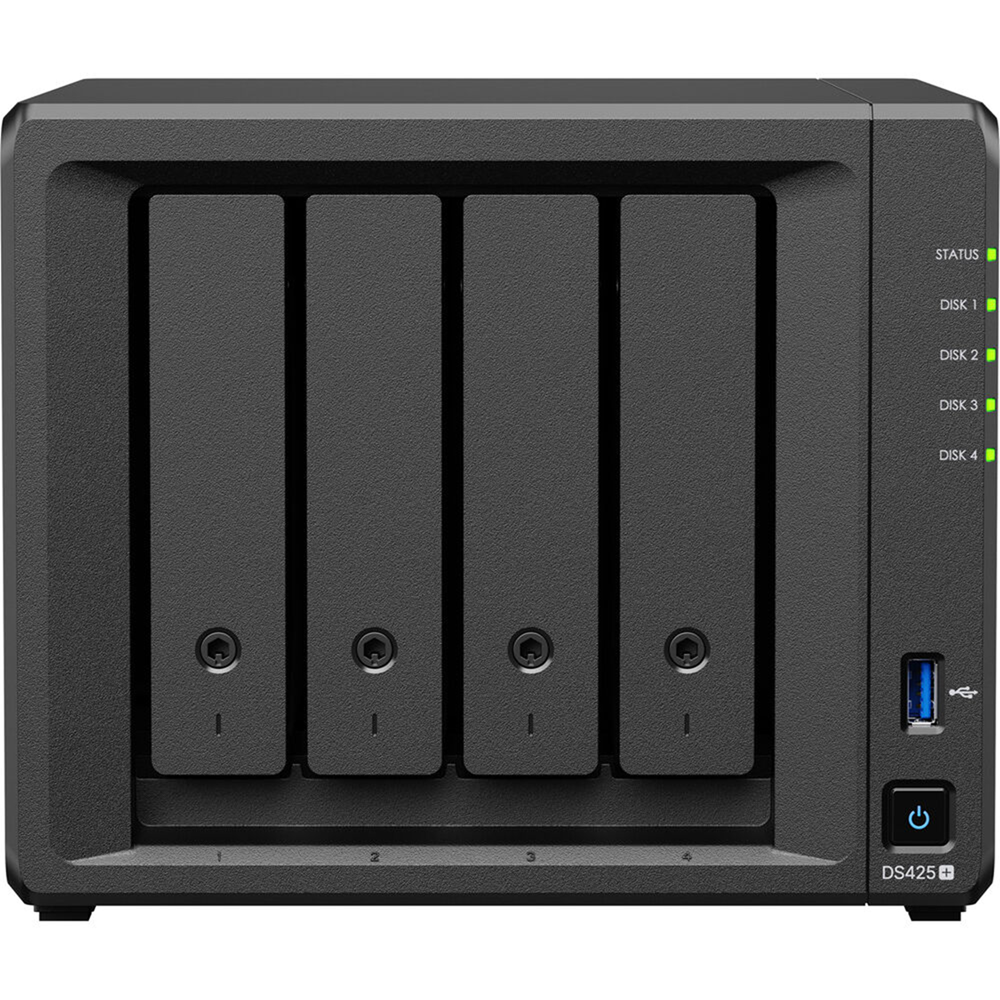
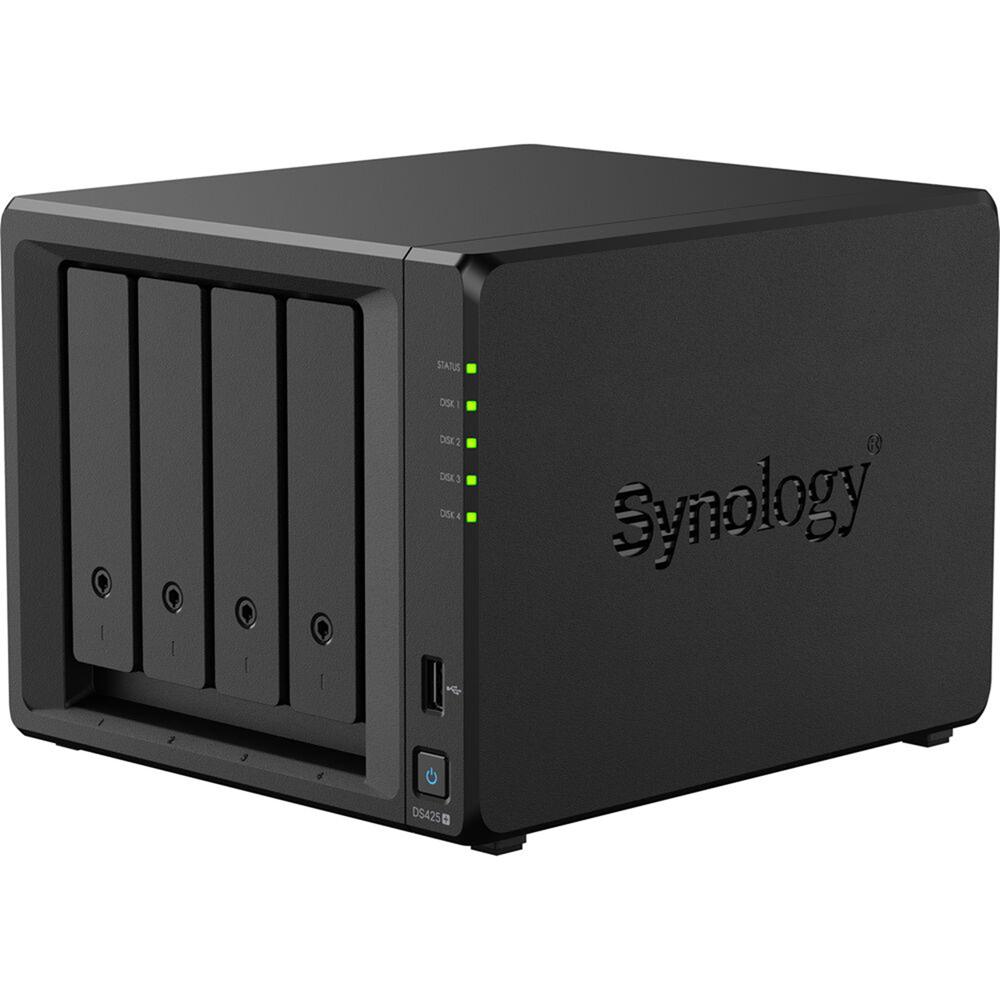
Synology DiskStation DS425+ 4-Bay NAS Enclosure Case, 2.5GbE

Product Code: DS425+ SKU: PCK17440 Categories: , ,
Synology
Availability:

In stock


Synology 

Intel Celeron J4125 – CPU
2 GB DDR4 non-ECC – Built-in
6 GB (2 GB + 4 GB) – Max. Memory
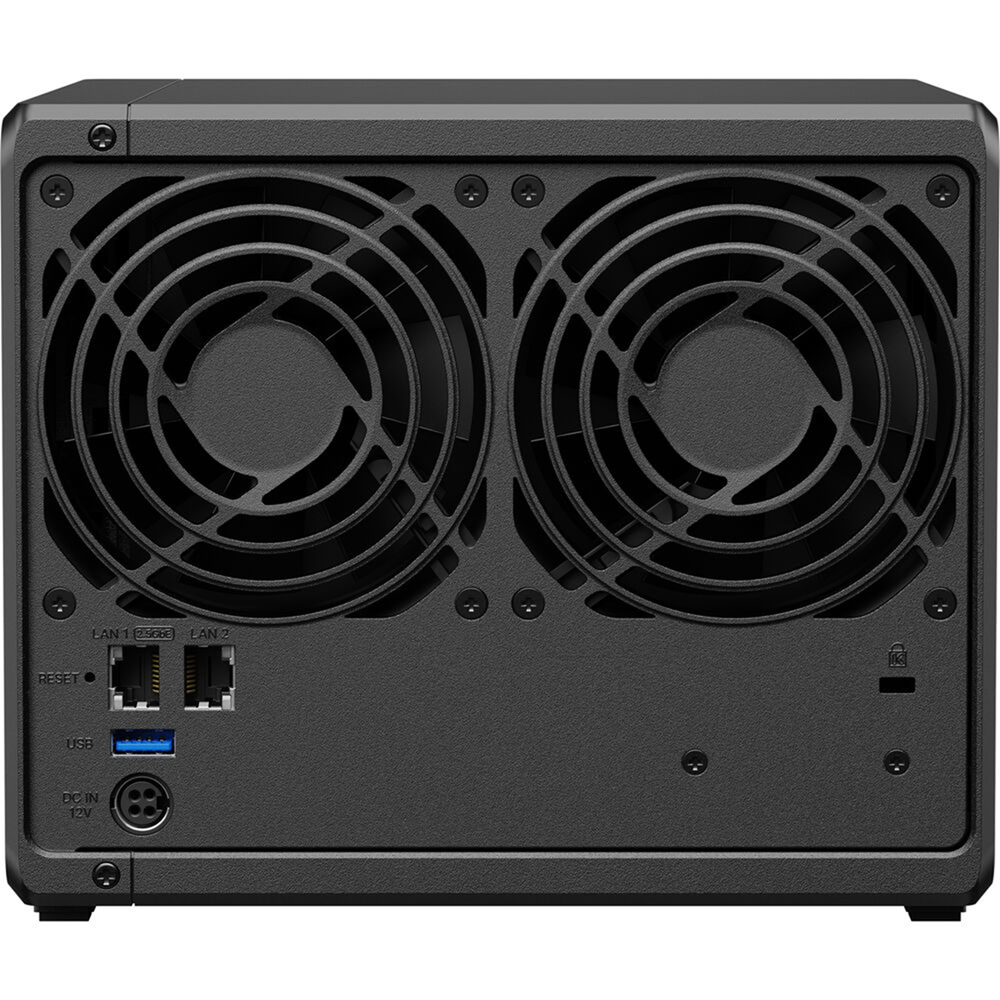
1 x Gigabit Ethernet Port
1 x 2.5GbE LAN Port RJ45
RAID 0, 1, 5, 6, 10, Hybrid, JBOD
3.5″ SATA HDD/2.5″ SATA SSD/M.2 2280 NVMe SSD

KD 145.000

In stock

Buy Now

Synology 

DiskStation DS425+

A compact storage hub with 100% data ownership

Conquer data chaos

Compact 4-bay
Up to 80 TB of raw storage1,2
Speedy storage
Built-in 2.5GbE port and over 278/281 MB/s sequential read/write3
Versatile applications
Back up multiple endpoints, manage 40 IP cameras4, or safely sync and share files across sites

2.5GbE connectivity and diverse storage options

The DS425+ features built-in 2.5GbE networking and supports both SATA SSDs and HDDs in 2.5″/3.5″ internal bays, as well as M.2 NVMe drives via M.2 slots for use cache.1,5

The DS425+ achieves up to 278 MB/s read and 281 MB/s write speeds

It features a built-in 2.5GbE port

And supports two M.2 NVMe slots for caching

Store, share, and protect

Manage all your documents, photos, and other files, back up applications and devices, and protect your assets with professional video surveillance.


Private cloud for seamless data access

Streamlined file management and collaboration

Store, sync, access, and share data from any device, wherever you are. Work seamlessly between different platforms and devices, and access your files through mobile apps, desktop clients, and a browser-based interface. Quickly and easily roll back files in case of accidental deletion, mistakes, malware, etc., with versioning. Learn more

A private photo storage and management solution

Effortlessly back up and organize photos, videos, and other visual assets using intuitive management tools. Automatically organize your content into albums and create secure share links for stakeholders and teammates. Learn more

Boost team productivity with collaborative tools

Enhance workplace collaboration with Synology’s productivity solutions. Create, edit, and share documents across teams in real time. Host an on-premises mail server to provide web-based email access while maintaining full data ownership. Additionally, stay connected through secure one-on-one chats, public channels, encrypted private channels, and group conversations. Learn more

Image showing ways to access your Synology private cloud. Packages shown are Synology Drive, Synology Drive Client, and Synology Drive ShareSync.
Image showing that Synology Photos can be accessed via web browser or mobile app.
Image showing icons of Synology Drive, Office, Drive, MailPlus, Calendar, and Chat

Multi-site synchronization to empower global workflows

NAS-to-NAS synchronization

Improve workflow efficiency and team alignment across data sites with automatic one- or two-way site-to-site syncing. Files and folders are kept up-to-date across sites, so everyone stays aligned, whether at home, in the office, or across different branches — all while maintaining full control of your data. Learn more

Cloud-powered multi-site syncing

Empower global workflows with high-speed access to data from anywhere in your network. Our hybrid cloud solution caches frequently used files locally for rapid access, while less frequently accessed data is stored in the cloud, reducing your on-site storage requirements.

Sync to public cloud providers

Automatically keep data in sync between Synology NAS and major cloud providers, including BackBlaze B2, Dropbox, Google Drive, and Microsoft OneDrive. Multiple protocol support, client-side encryption, and customizable sync and bandwidth controls enable efficient storage management across various platforms. Learn more

Image showing a Synology system syncing to another Synology system using Drive ShareSync
Diagram showing C2 Storage for Hybrid Share keeping headquarters and multiple branch offices in sync
Cloud Sync is compatible with major public cloud services

Comprehensive data backup, protection, and recovery solutions

Back up PCs, smartphones, cloud apps, and more

Consolidate and automate backup tasks for PCs, file servers, VMs, SaaS applications, and more. Administer device backups remotely through a centralized portal and quickly restore specific files or entire devices to keep your business up and running. Take advantage of built-in backup solutions designed to protect your data with seamless 3-2-1 backup configurations.

Comprehensive and flexible Synology system backups

Protect all data, applications, and configurations on your Synology systems with comprehensive scheduled backups, including bare-metal backups, to local and remote servers, external drives, or cloud storage destinations, including Synology C2 Storage.Learn more

Tamper-proof protection with immutable snapshots

Safeguard critical LUNs and shared folders with automated immutable snapshots backed by custom retention policies. Built-in support for offsite replication further ensures robust business continuity. Learn more

Backup PCs, servers, and VMs using Active Backup for Business. Backup folders and mobile photos and videos with Synology Drive. Backup Google Workspace with Active Backup for Google Workspace. Backup Microsoft 365 with Active Backup for Microsoft 365.
Hyper Backup can be used to backup Synology systems to various destinations.
Image illustrating snapshots from a Synology system mirrored offsite using Snapshot Replication.

Smart surveillance

Synology Surveillance Station

Protecting your business has never been easier, with centralized management, support for over 8,700 IP camera models, and remote monitoring and playback. Synology’s scalable video management system provides all the tools you need for live monitoring, investigation, management, and backup.7Learn more

Dual recording to the cloud

Secure your surveillance footage with robust cloud backup that supports end-to-end encryption. Our cloud-based surveillance backup solution safeguards your Surveillance Station recordings, allowing you to access, view, share, and download footage through a convenient web portal. Ensure your data remains available even if your on-premises system is compromised.Learn more

Image illustrating a Synology system as the center of a smart surveillance solution.
Image illustrating a Synology system used as a recording server while simultaneously backing up footage to a secondary or off-site Synology system and to the C2 cloud.

Centralized monitoring and management

Monitor and manage your Synology fleet from a central interface, on-prem or in the cloud.

Performance backed by Synology drives

Designed for Synology systems, Synology drives deliver consistent performance and unmatched reliability for your deployments.1
SKU: PCK17440 Categories: , ,
Brand Name

Synology

Features

2.5G, Gigabit

Hardware Specifications
CPU CPU Model Intel Celeron J4125
CPU Quantity 1
CPU Core 4
CPU Architecture 64-bit
CPU Frequency 2.0 (base) / 2.7 (turbo) GHz
Hardware Encryption Engine
Memory System Memory 2 GB DDR4 non-ECC
Total Memory Slots 1
Maximum Memory Capacity 6 GB (2 GB + 4 GB)
Notes ·        Synology reserves the right to replace memory modules with the same or higher frequency based on supplier’s product life cycle status. Rest assured that the compatibility and stability have been strictly verified with the same benchmark to ensure identical performance.

·        Please select Synology memory modules for optimum compatibility and reliability. Synology will not provide complete product warranty or technical support if non-Synology memory modules are used for memory expansion.

Storage Drive Bays 4
M.2 Drive Slots 2 (NVMe)
Drive Type (See all supported drives) ·        3.5″ SATA HDD

·        2.5″ SATA SSD

·        M.2 2280 NVMe SSD

Hot Swappable Drive*
Notes ·        The hot swappable drive feature is not supported by M.2 SSD slots.

·        Compatible drives are mandatory. Please consult our compatibility list before purchasing hard drives. For more details, please refer to this article.

External Ports RJ-45 1GbE LAN Port 1
RJ-45 2.5GbE LAN Port 1
USB 3.2 Gen 1 Port 2
Notes This device’s 1GbE LAN ports have a maximum transmission unit (MTU) size of 1,500 bytes.
Appearance Size (Height x Width x Depth) 166 mm x 199 mm x 223 mm
Weight 2.18 kg
Others System Fan 92 mm x 92 mm x 2 pcs
Fan Speed Mode ·        Full-Speed Mode

·        Cool Mode

·        Quiet Mode

Brightness Adjustable Front LED Indicators
Power Recovery
Noise Level* 21.6 dB(A)
Scheduled Power On / Off
Wake on LAN / WAN
Power Supply Unit / Adapter 90 watts
AC Input Power Voltage 100V to 240V AC
Power Frequency 50/60 Hz, Single Phase
Power Consumption* 28.25 watts (Access)
6.10 watts (HDD Hibernation)
British Thermal Unit 96.33 BTU/hr (Access)
20.79 BTU/hr (HDD Hibernation)
Notes ·        For more information on how power consumption is measured, refer to this article.

·        Noise testing was conducted with the Synology system fully installed with Synology SATA SSDs and in an idle state. Two G.R.A.S. type 40AE microphones were placed at a 1 m distance from the front and rear of the device. Background noise: 16.49-17.51 dB(A); Temperature: 24.25-25.75˚C; Humidity: 58.2-61.8%.

Temperature Operating Temperature 0°C to 40°C (32°F to 104°F)
Storage Temperature -20°C to 60°C (-5°F to 140°F)
Operating Humidity 8% to 80% RH
Storage Humidity 5% to 95% RH
Certification ·        FCC

·        CE

·        BSMI

·        VCCI

·        RCM

·        UKCA

·        EAC

·        CCC

·        KC

·        BIS

Warranty Limited
Notes ·        The warranty period starts from the purchase date as stated on your purchase receipt. (Learn more)

·        Extended Warranty Plus is only available in Europe and North America. EW201/EW202 is only available in Asia, Africa, and Oceania. For exact availability information please visit their respective websites.

Environment RoHS Compliant
Packaging Content ·        Main Unit X 1

·        Accessory Pack X 1

·        AC Power Adapter X 1

·        AC Power Cord X 1

·        RJ-45 LAN Cable X 2